我以前写过 10 篇用 R 语言绘制地图和空间数据可视化相关的博客。
- 【热门文章】R 语言画中国地图 找各种地图数据、检查数据可用性
- 【热门文章】空间数据可视化与 R 语言(上篇) 介绍空间数据操作 sf 包,用 echarts4r、 leaflet、plotly 和 lattice 包绘制可视化图形。
- 空间数据可视化与 R 语言(中篇) 找各类在线地图服务,结合在线地图绘制空间数据的各类可视化图形。
- 空间数据可视化与 R 语言(下篇) 不同类型的空间数据和不同的绘制方法。
- 【进阶】地区分布图及其应用 总结 R 语言中 7 种空间数据可视化的绘图方法。
- 【进阶】R 语言制作地区分布图及其动画 以动画的方式可视化空间数据(时空数据)。
- 【高阶】预测朗格拉普岛核辐射强度的分布 R 语言做空间分析和建模。
- 【进阶】中国常住人口分布图(2023 年市级) leaflet 包 可视化中国各市的常住人口数及其变化。
- 地震越来越频繁了吗? ggplot2 包绘制地图。
- highcharter 食谱 highcharter 包绘制地图。
今天,用一些 Python 模块绘制一幅邵阳市人口的空间分布图。
读取邵阳市的地图数据,这是一个 JSON 格式的数据。用 geopandas 模块读取该数据,之后,可以类似 pandas 模块那样操作数据。
import geopandas as gpd
shaoyang = gpd.read_file('data/邵阳市.json')
# 坐标参考系
shaoyang.crs
## <Geographic 2D CRS: EPSG:4326>
## Name: WGS 84
## Axis Info [ellipsoidal]:
## - Lat[north]: Geodetic latitude (degree)
## - Lon[east]: Geodetic longitude (degree)
## Area of Use:
## - name: World.
## - bounds: (-180.0, -90.0, 180.0, 90.0)
## Datum: World Geodetic System 1984 ensemble
## - Ellipsoid: WGS 84
## - Prime Meridian: Greenwich# 查看前几行数据
shaoyang.head()## adcode ... geometry
## 0 430502 ... MULTIPOLYGON (((111.60058 27.28676, 111.59138 ...
## 1 430503 ... MULTIPOLYGON (((111.46854 27.24214, 111.46591 ...
## 2 430511 ... MULTIPOLYGON (((111.48548 27.2898, 111.47899 2...
## 3 430522 ... MULTIPOLYGON (((111.82375 27.44738, 111.81949 ...
## 4 430523 ... MULTIPOLYGON (((111.66976 27.03255, 111.67033 ...
##
## [5 rows x 10 columns]显示了行数和列数,第一列和最后一列,中间列的数据都省略了。下面查看行政区域编码 ‘adcode’, 区县名称 ‘name’ 和地理边界 ‘geometry’ 三列。
shaoyang.loc[:, ['adcode', 'name', 'geometry']]## adcode name geometry
## 0 430502 双清区 MULTIPOLYGON (((111.60058 27.28676, 111.59138 ...
## 1 430503 大祥区 MULTIPOLYGON (((111.46854 27.24214, 111.46591 ...
## 2 430511 北塔区 MULTIPOLYGON (((111.48548 27.2898, 111.47899 2...
## 3 430522 新邵县 MULTIPOLYGON (((111.82375 27.44738, 111.81949 ...
## 4 430523 邵阳县 MULTIPOLYGON (((111.66976 27.03255, 111.67033 ...
## 5 430524 隆回县 MULTIPOLYGON (((110.64826 27.36729, 110.65633 ...
## 6 430525 洞口县 MULTIPOLYGON (((110.91961 27.02706, 110.92092 ...
## 7 430527 绥宁县 MULTIPOLYGON (((110.14853 26.9897, 110.14626 2...
## 8 430528 新宁县 MULTIPOLYGON (((110.58552 26.30133, 110.58702 ...
## 9 430529 城步苗族自治县 MULTIPOLYGON (((109.99175 26.26846, 109.99111 ...
## 10 430581 武冈市 MULTIPOLYGON (((110.54002 26.85363, 110.53864 ...
## 11 430582 邵东市 MULTIPOLYGON (((111.60058 27.28676, 111.60498 ...邵阳市一共 12 个区县。还可以查看所有的列。
# 查看所有的列
shaoyang.columns
## Index(['adcode', 'name', 'center', 'centroid', 'childrenNum', 'level',
## 'parent', 'subFeatureIndex', 'acroutes', 'geometry'],
## dtype='str')# 查看所有的列的数据类型
shaoyang.dtypes## adcode int32
## name str
## center object
## centroid object
## childrenNum int32
## level str
## parent object
## subFeatureIndex int32
## acroutes object
## geometry geometry
## dtype: object绘制邵阳市区县级行政区划图,默认设置下的效果图。
shaoyang.plot()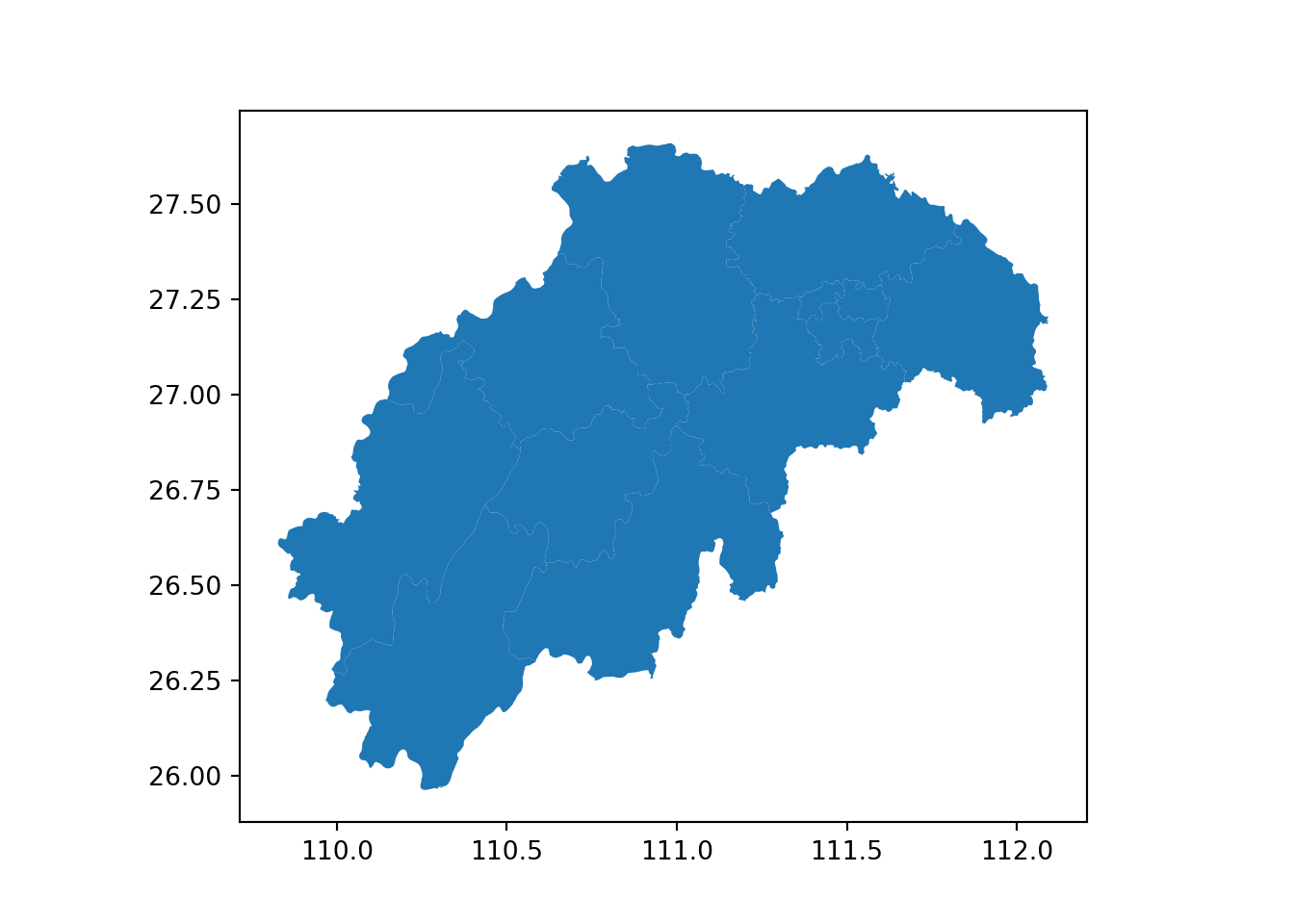
有了地图数据集后,下面准备邵阳市各区县 2023年的常住年末户数(单位:万户)及人口(单位:万人)数据。
import pandas as pd
pop23 = pd.DataFrame(
    {
        "adcode": [430502, 430503, 430511, 430522, 430523, 430524, 430525, 430527, 430528, 430529, 430581, 430582],
        "name": ["双清区", "大祥区", "北塔区", "新邵县", "邵阳县", "隆回县", "洞口县", "绥宁县", "新宁县", "城步苗族自治县", "武冈市", "邵东市"],
        "household": [11.55, 14.14, 4.86, 19.94, 24.01, 35.18, 22.6, 10.83, 16.69, 7.67, 22.65, 36.59],
        "population": [32.01, 36.32, 12.37, 58.59, 71.45, 98.02, 65.71, 28.32, 49.78, 22.11, 62.01, 99.19]
    }
)
pop23
## adcode name household population
## 0 430502 双清区 11.55 32.01
## 1 430503 大祥区 14.14 36.32
## 2 430511 北塔区 4.86 12.37
## 3 430522 新邵县 19.94 58.59
## 4 430523 邵阳县 24.01 71.45
## 5 430524 隆回县 35.18 98.02
## 6 430525 洞口县 22.60 65.71
## 7 430527 绥宁县 10.83 28.32
## 8 430528 新宁县 16.69 49.78
## 9 430529 城步苗族自治县 7.67 22.11
## 10 430581 武冈市 22.65 62.01
## 11 430582 邵东市 36.59 99.19调用 pandas 模块的 merge 方法将地图数据和常住人口数据合并至一个数据框内。
mydata = pd.merge(shaoyang.loc[:, ['name', 'geometry']], pop23, on="name")最后,借助模块 geopandas 的 plot 方法 绘制可视化图形,指定要可视化的数据列,选择一个合适的调色板,显示图例。
mydata.plot(column="population", cmap='OrRd', legend=True)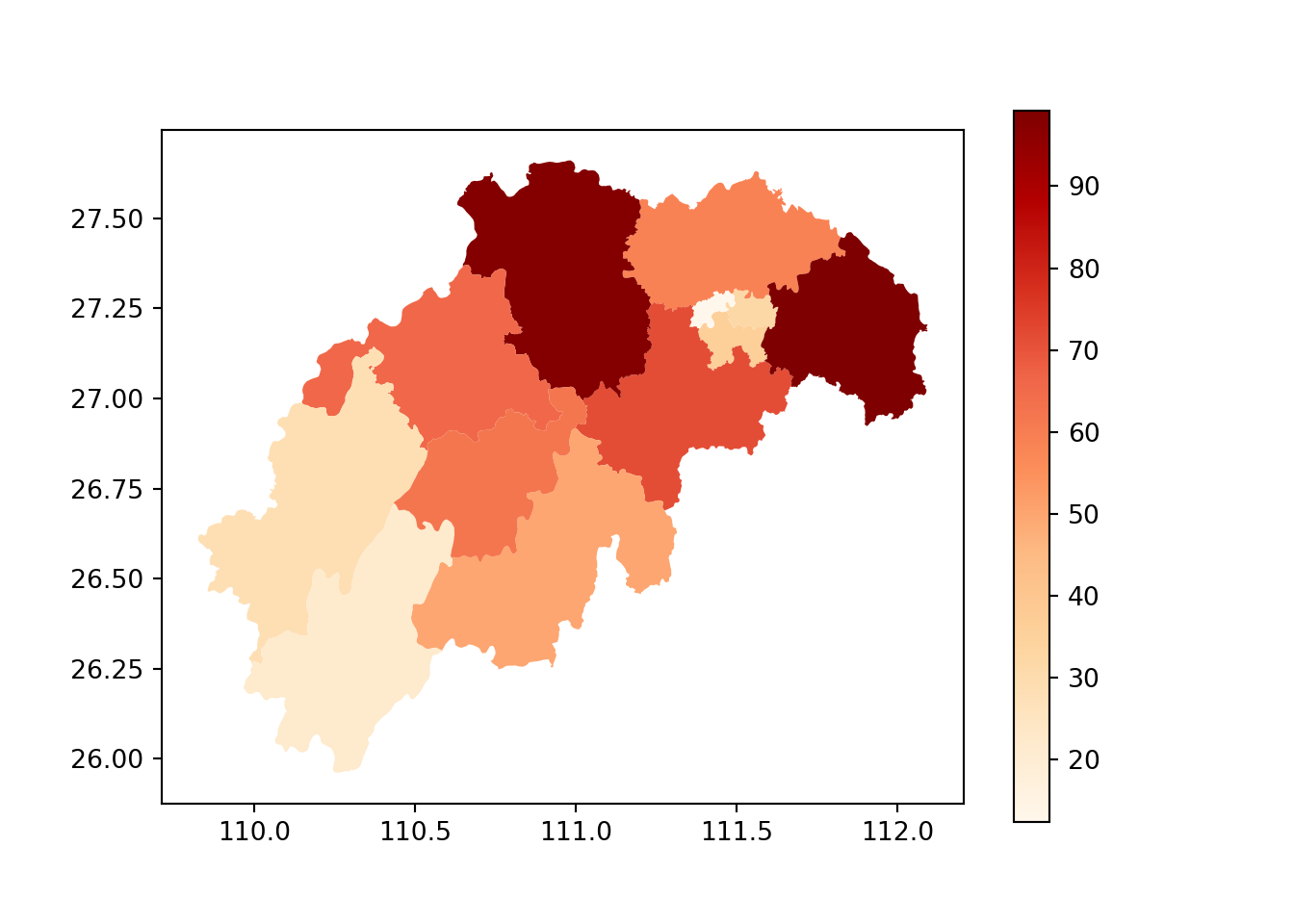
matplotlib 模块内置的调色板还有很多,运行如下代码可查看。
from matplotlib import colormaps
# 多少个调色板
len(list(colormaps))
## 180# 全部显示出来
df = pd.DataFrame(list(colormaps), columns=list("A"))
df["A"].to_numpy()## array(['magma', 'inferno', 'plasma', 'viridis', 'cividis', 'twilight',
## 'twilight_shifted', 'turbo', 'berlin', 'managua', 'vanimo',
## 'Blues', 'BrBG', 'BuGn', 'BuPu', 'CMRmap', 'GnBu', 'Greens',
## 'Greys', 'OrRd', 'Oranges', 'PRGn', 'PiYG', 'PuBu', 'PuBuGn',
## 'PuOr', 'PuRd', 'Purples', 'RdBu', 'RdGy', 'RdPu', 'RdYlBu',
## 'RdYlGn', 'Reds', 'Spectral', 'Wistia', 'YlGn', 'YlGnBu', 'YlOrBr',
## 'YlOrRd', 'afmhot', 'autumn', 'binary', 'bone', 'brg', 'bwr',
## 'cool', 'coolwarm', 'copper', 'cubehelix', 'flag', 'gist_earth',
## 'gist_gray', 'gist_heat', 'gist_ncar', 'gist_rainbow',
## 'gist_stern', 'gist_yarg', 'gnuplot', 'gnuplot2', 'gray', 'hot',
## 'hsv', 'jet', 'nipy_spectral', 'ocean', 'pink', 'prism', 'rainbow',
## 'seismic', 'spring', 'summer', 'terrain', 'winter', 'Accent',
## 'Dark2', 'Paired', 'Pastel1', 'Pastel2', 'Set1', 'Set2', 'Set3',
## 'tab10', 'tab20', 'tab20b', 'tab20c', 'grey', 'gist_grey',
## 'gist_yerg', 'Grays', 'magma_r', 'inferno_r', 'plasma_r',
## 'viridis_r', 'cividis_r', 'twilight_r', 'twilight_shifted_r',
## 'turbo_r', 'berlin_r', 'managua_r', 'vanimo_r', 'Blues_r',
## 'BrBG_r', 'BuGn_r', 'BuPu_r', 'CMRmap_r', 'GnBu_r', 'Greens_r',
## 'Greys_r', 'OrRd_r', 'Oranges_r', 'PRGn_r', 'PiYG_r', 'PuBu_r',
## 'PuBuGn_r', 'PuOr_r', 'PuRd_r', 'Purples_r', 'RdBu_r', 'RdGy_r',
## 'RdPu_r', 'RdYlBu_r', 'RdYlGn_r', 'Reds_r', 'Spectral_r',
## 'Wistia_r', 'YlGn_r', 'YlGnBu_r', 'YlOrBr_r', 'YlOrRd_r',
## 'afmhot_r', 'autumn_r', 'binary_r', 'bone_r', 'brg_r', 'bwr_r',
## 'cool_r', 'coolwarm_r', 'copper_r', 'cubehelix_r', 'flag_r',
## 'gist_earth_r', 'gist_gray_r', 'gist_heat_r', 'gist_ncar_r',
## 'gist_rainbow_r', 'gist_stern_r', 'gist_yarg_r', 'gnuplot_r',
## 'gnuplot2_r', 'gray_r', 'hot_r', 'hsv_r', 'jet_r',
## 'nipy_spectral_r', 'ocean_r', 'pink_r', 'prism_r', 'rainbow_r',
## 'seismic_r', 'spring_r', 'summer_r', 'terrain_r', 'winter_r',
## 'Accent_r', 'Dark2_r', 'Paired_r', 'Pastel1_r', 'Pastel2_r',
## 'Set1_r', 'Set2_r', 'Set3_r', 'tab10_r', 'tab20_r', 'tab20b_r',
## 'tab20c_r', 'grey_r', 'gist_grey_r', 'gist_yerg_r', 'Grays_r'],
## dtype=object)实际上是 90 个调色板,后缀 _r 表示反向。
geopandas 还可以画各种常规图形,如散点图、折线图、箱线图、直方图。
mydata.plot(kind="scatter", x="household", y="population")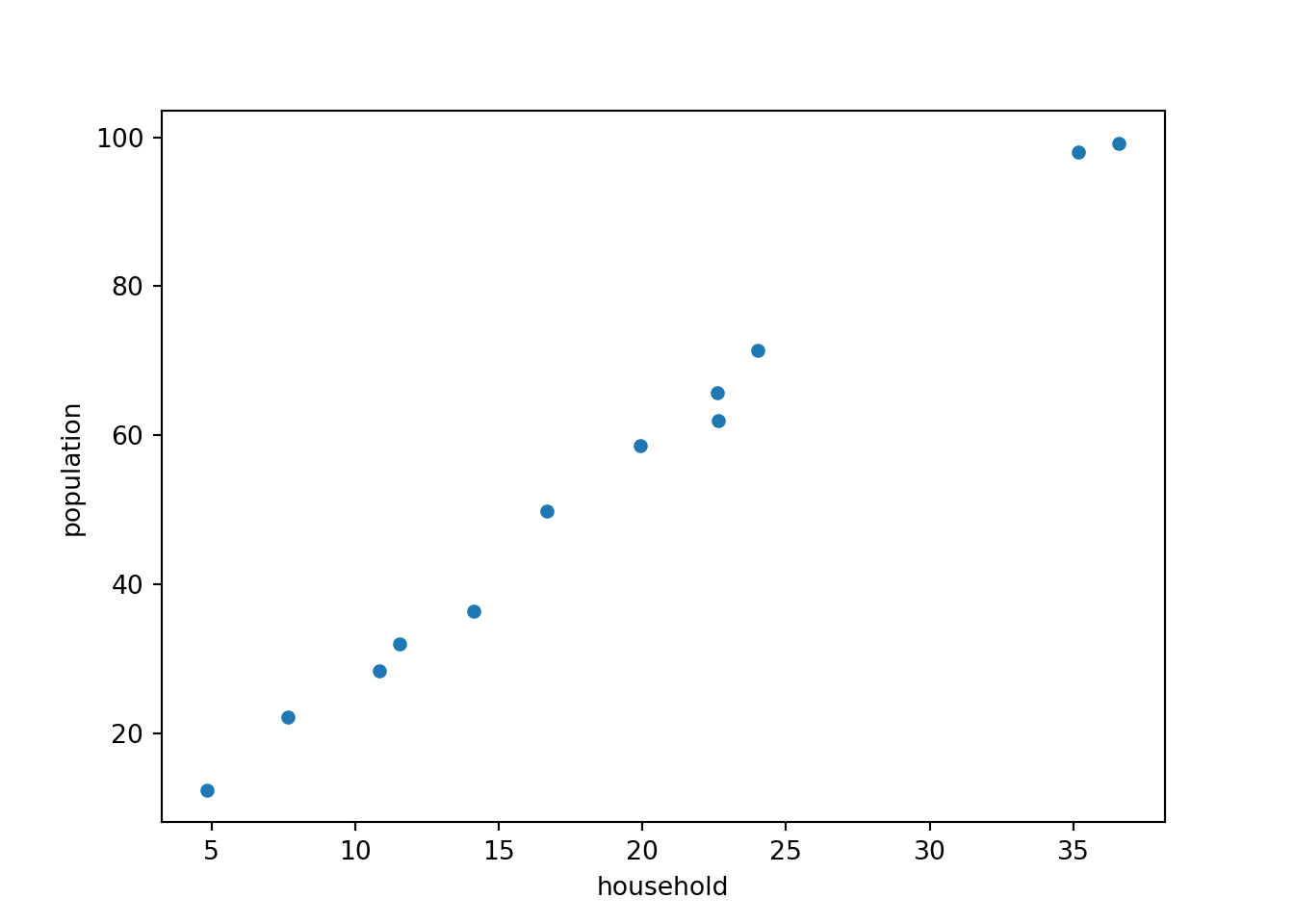
geopandas 还可以绘制交互图形,此时,需要安装额外的 Python 模块 folium (调用 leaflet.js)和 mapclassify 。
mydata.explore(column="population", tooltip="population", cmap='OrRd')Make this Notebook Trusted to load map: File -> Trust Notebook
下面补充本文运行的环境。
reticulate::py_config()## python: /opt/.virtualenvs/r-tensorflow/bin/python
## libpython: /opt/homebrew/opt/python@3.13/Frameworks/Python.framework/Versions/3.13/lib/python3.13/config-3.13-darwin/libpython3.13.dylib
## pythonhome: /opt/.virtualenvs/r-tensorflow:/opt/.virtualenvs/r-tensorflow
## virtualenv: /opt/.virtualenvs/r-tensorflow/bin/activate_this.py
## version: 3.13.11 (main, Dec 5 2025, 16:06:33) [Clang 17.0.0 (clang-1700.4.4.1)]
## numpy: /opt/.virtualenvs/r-tensorflow/lib/python3.13/site-packages/numpy
## numpy_version: 2.3.4
##
## NOTE: Python version was forced by RETICULATE_PYTHON_ENV所用 Python 模块的版本,如下。
- matplotlib 3.10.7
- pandas 3.0.0
- geopandas 1.1.3
- shapely 2.1.2
- folium 0.20.0
- mapclassify 2.10.0
这是用到的几个 Python 模块的官方网站。
- https://github.com/geopandas/geopandas
- https://github.com/shapely/shapely
- https://matplotlib.org/stable/
- Scientific Visualization: Python + Matplotlib Nicolas P. Rougier, Bordeaux, November 2021. Matplotlib 高级绘图画廊。